
Your household, one timeline
What is Family Bee?
Family Bee is a shared family calendar and trip planner for Apple devices, created by Guy Goldstein. It keeps your household's travel, events, records, and favorites in one place — synced privately over iCloud to the people you invite.
Plan trips, dinners, and gatherings on iPhone, iPad, and Mac. Attach flights and hotels, paste confirmation emails, refresh live flight status near departure, lock passports behind Face ID, and save movies, TV, books, restaurants, and recipes everyone actually wants. No separate account — it works with your Apple ID.
- iPhone, iPad & Mac
- Private iCloud sharing
- No extra account
Inside the app
Built for how families actually plan
A shared timeline, live flights, a locked records vault, and household favorites — on Apple devices.
Getting started
Three steps, then you are planning together
01
Start a household
Open Family Bee with the Apple ID you already use. There is no separate username or password to create.
02
Invite with iCloud
Share the family with the people you trust. Only invitees can see the household — it is not a public network.
03
Plan together
Add trips, dinners, and bookings on one timeline. Save movies, TV, books, restaurants, and recipes so everyone can find them.
Features
Everything your family needs in one place
From the next trip to passport expiry — plus movies, TV, books, restaurants, and recipes the household keeps.
Timeline
One calendar for trips, dinners, and everything in between
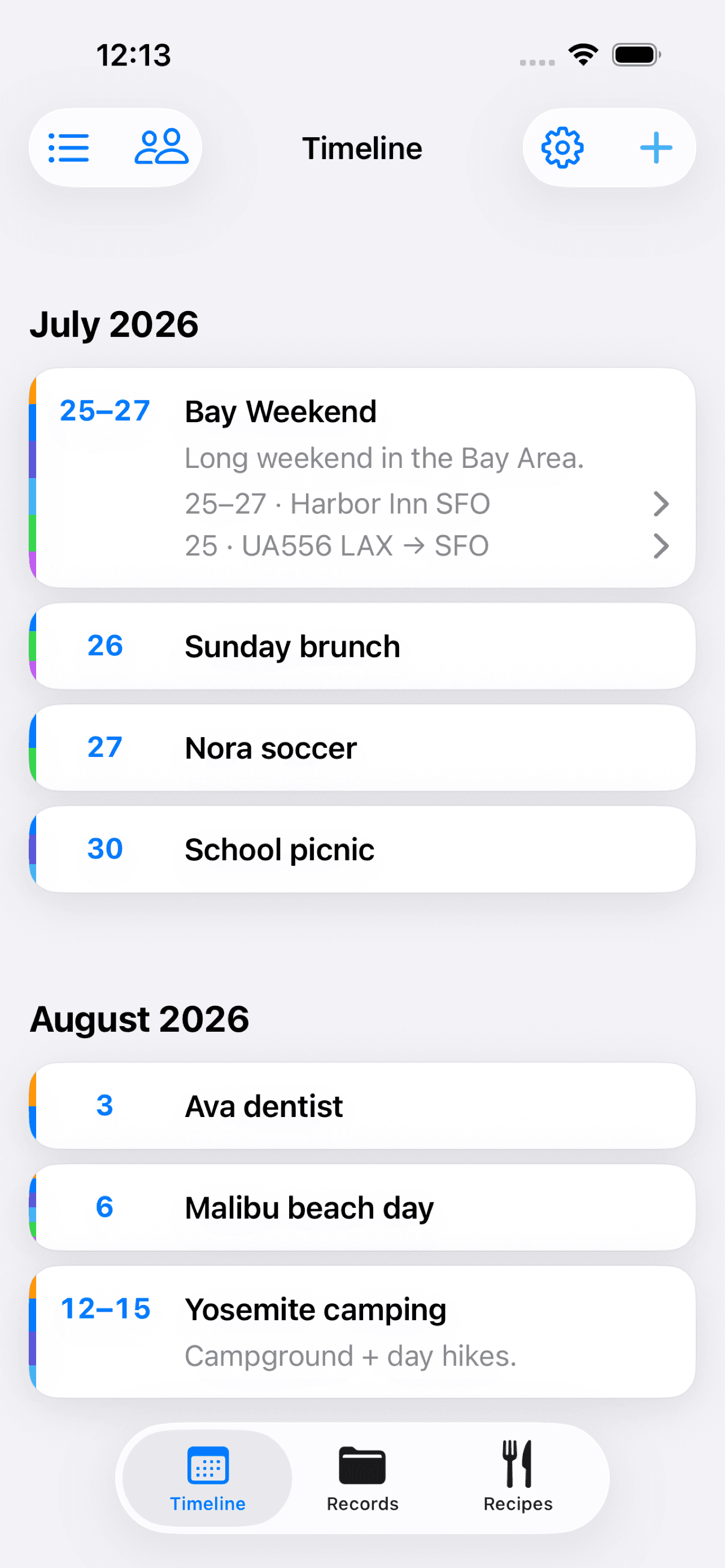
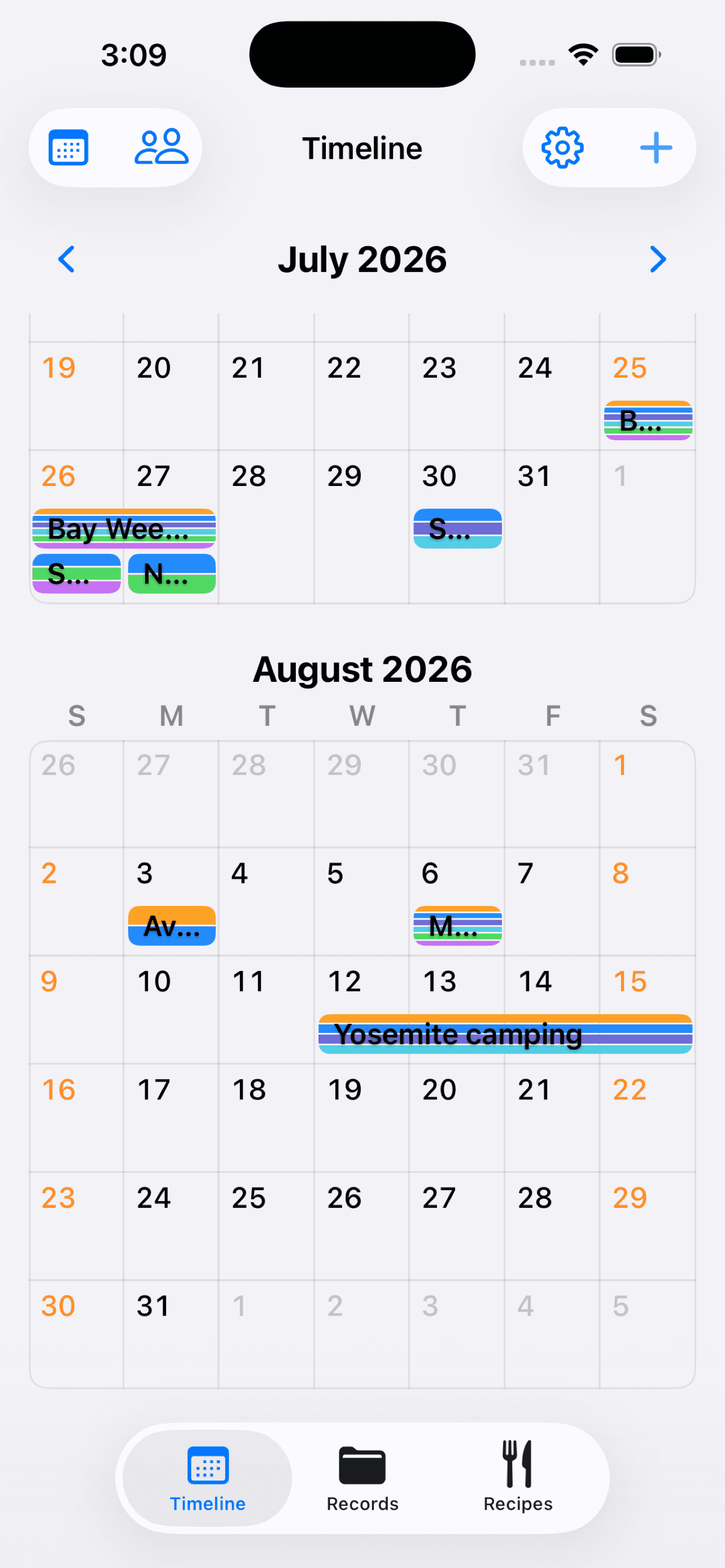
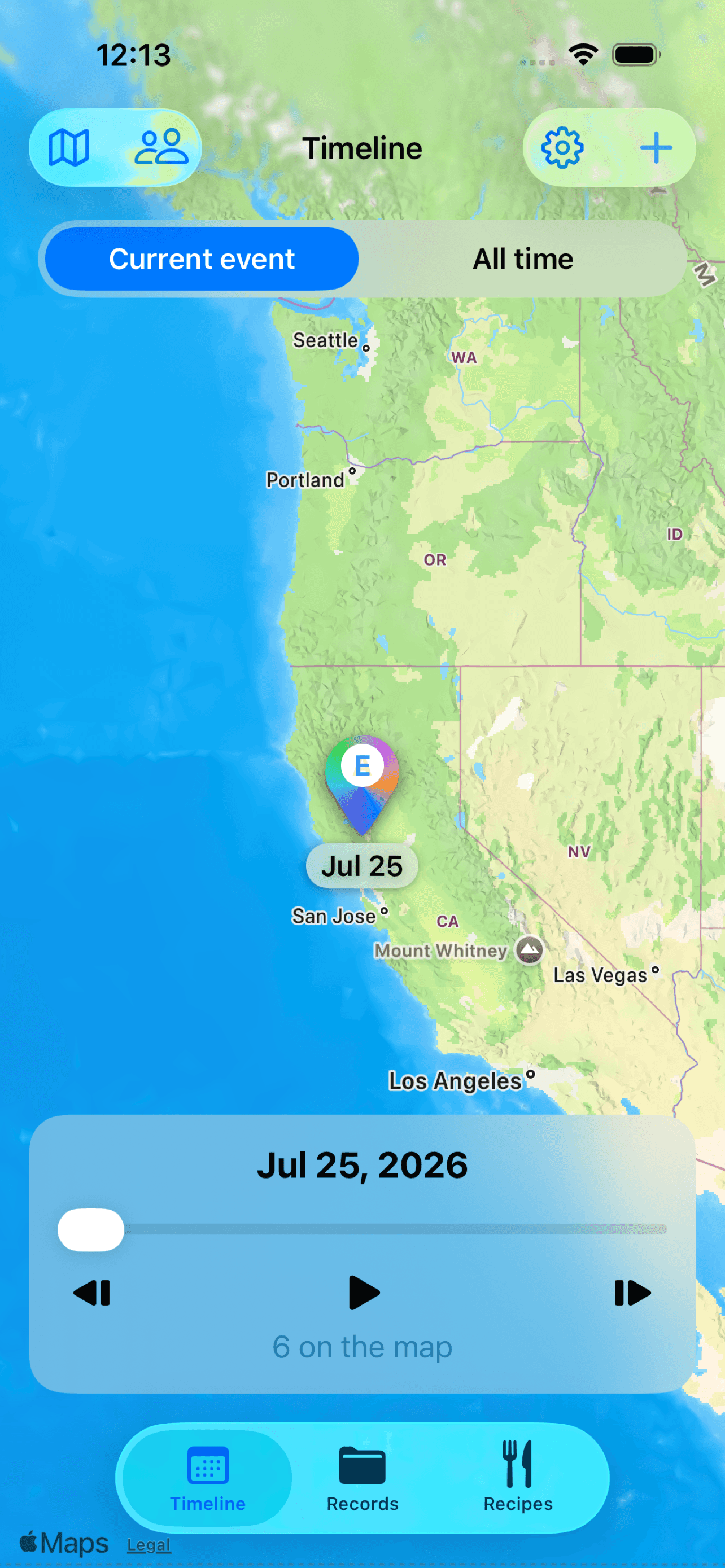
See who is going, when you are traveling, and what comes next — as a list, a month calendar, or a map. Trips stay date-based; dinners, movies, concerts, and parties can have start and end times.
- Mark who is attending and pin a place when it helps
- Finished events can Auto Archive a week after they end
- Keep the household on one timeline instead of a group chat thread
Travel
Flights, hotels, and live status without retyping
Attach bookings to each trip — flights, hotels, cars, tickets, and notes. Paste a confirmation email, or share from Mail on iPhone and iPad, to fill in the details.
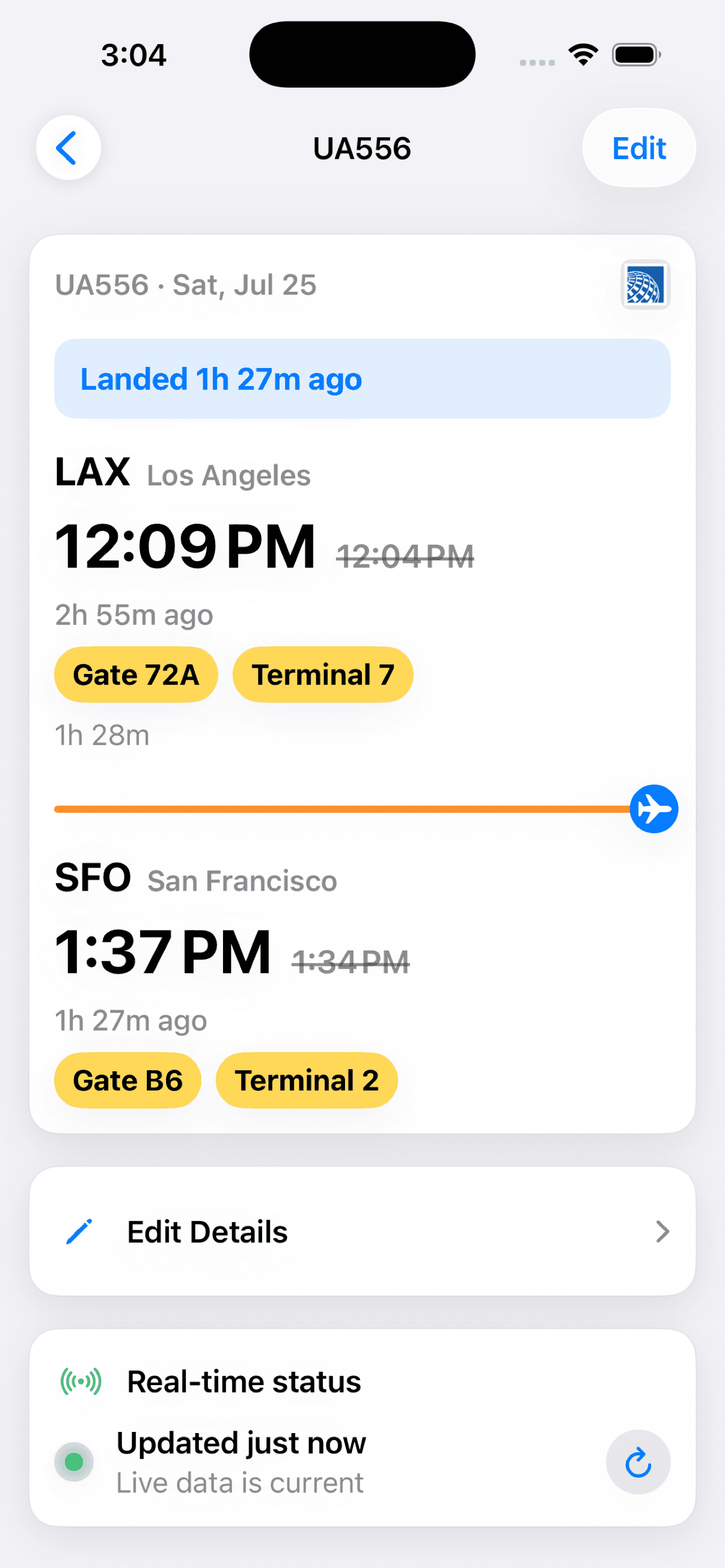
- Refresh live flight status near departure — delays, gates, and times when available
- Everyone invited sees the same itinerary on iPhone, iPad, and Mac
- Track flight logs and visited countries on the Fun tab
Records
Passports and household documents, locked on the device
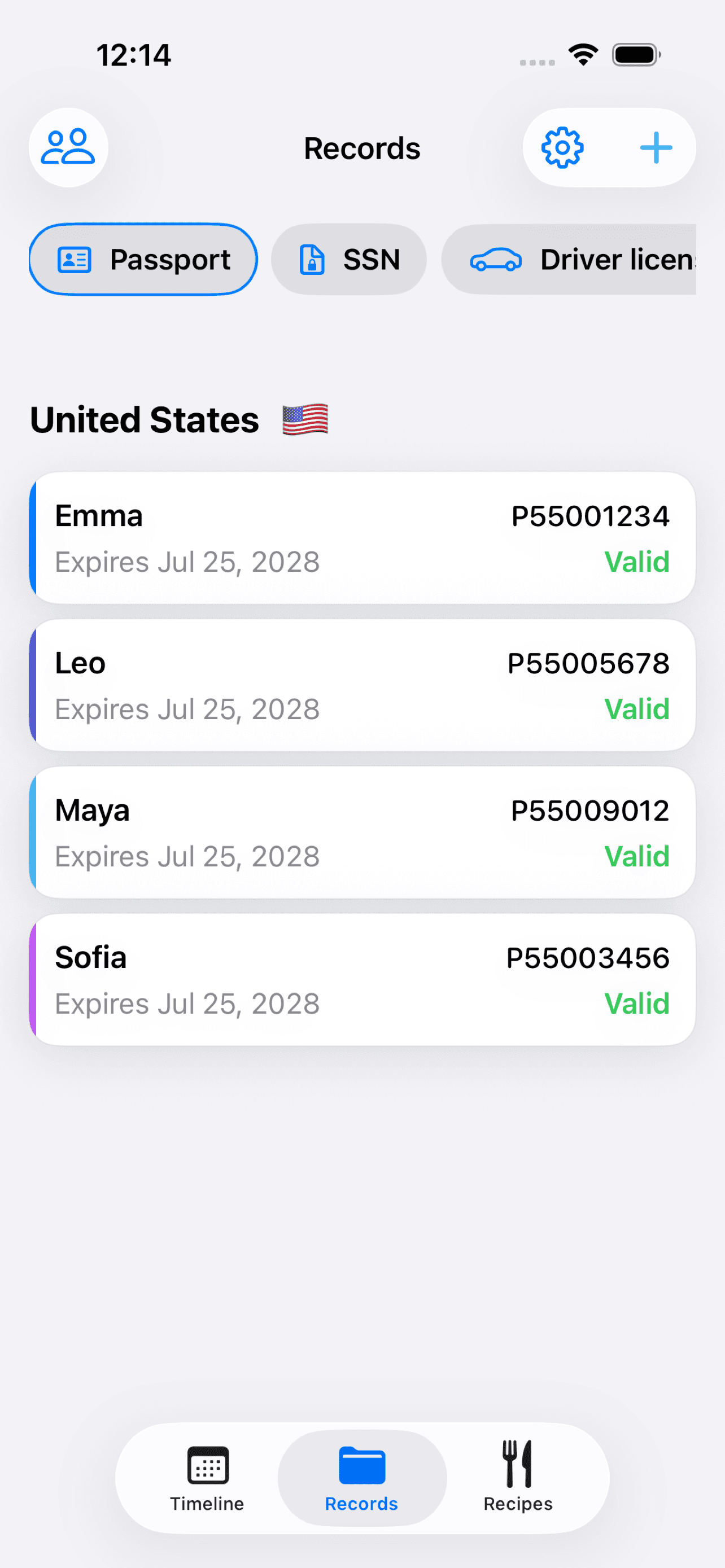
Store passports, licenses, TSA PreCheck numbers, cars, insurance, and airline mileage accounts for the family. Track expiry dates with reminders before renewal is due.
- Lock the vault on each device with Face ID or your Mac password
- Sensitive document fields are encrypted in iCloud
- Share scans into Records from the iPhone and iPad share extension
Fun & Picks
Movies, TV, and books the household actually likes
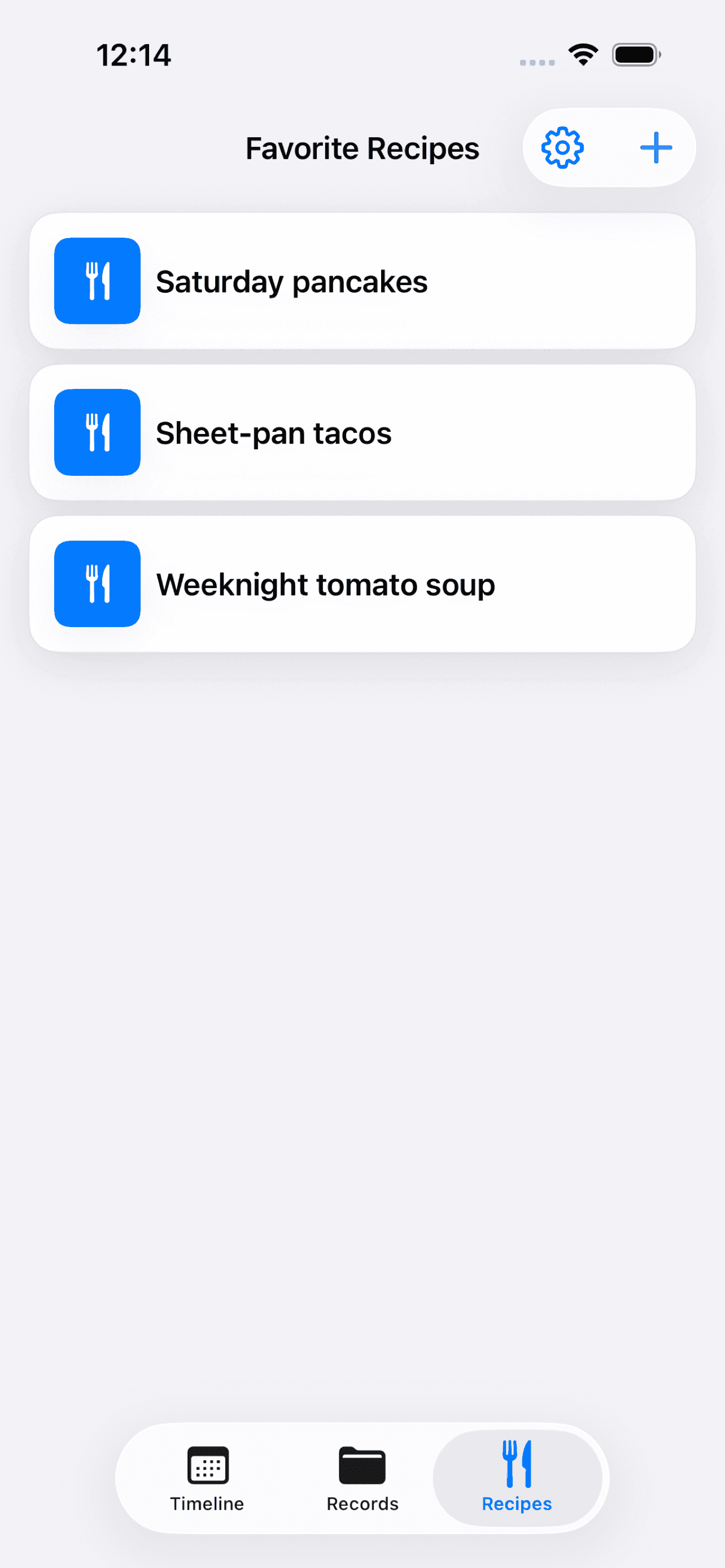
Picks is the shared list for what you watch, read, eat, and cook. Save movies and TV with genre and where to watch, books and podcasts you are into, plus restaurants and family recipes — with cuisine and city when it helps.
- Movies
- TV
- Books
- Restaurants
- Podcasts
- Recipes
- Movies and TV include genre and a watch service, so you are not hunting through four apps
- Books and podcasts sit next to the rest of the family list
- Restaurants and recipes live in the same Picks area — one place, not a group chat thread
At a glance
What Family Bee includes
01
Timeline & family events
Build a shared family calendar for trips, dinners, movies, concerts, and parties. See who is going, pin a place when it helps, and switch between list, calendar, and map.
02
Travel bookings & smart import
Attach flights, hotels, cars, and other bookings to each trip. Paste a confirmation email, or share from Mail on iPhone and iPad, to fill in details without retyping.
03
Live flight status
Refresh live flight status near departure — delays, gates, and times when available — so everyone stays in sync.
04
Household records vault
Store passports, licenses, TSA PreCheck numbers, cars, and mileage accounts. Track expiry dates with reminders, and lock the vault with Face ID or your Mac password.
05
Movies, TV, books & recipes
Household Picks for movies, TV, books, restaurants, podcasts, and family recipes. Note genre, cuisine, city, and where to watch or listen so everyone can find the same list.
06
Flight logs & countries
Keep a running flight log and a visited-countries view on the Fun tab — a household record of where you have been, separate from the next trip on the timeline.
07
Auto Archive
Finished events move to Archive a week after they end, so the timeline stays focused on what is next. Turn it off in Settings if you prefer to file things yourself.
08
Invite-only iCloud sharing
Works with your Apple ID — no separate account. Invite family with iCloud sharing; only people you add can see the household. Sensitive fields are encrypted in iCloud.
Built for Apple
Private by design, shared only with the people you invite
Family Bee uses the Apple ID and iCloud sharing you already know. Published by Viva Longer LLC. Support: info@vivalonger.com.
- Invite with iCloud sharing — only people you add can see the household
- No separate Family Bee account — it works with your Apple ID
- Sensitive document fields are encrypted in iCloud
- Appearance and notification preferences stay on each device
Platforms
Native on iPhone, iPad, and Mac
The same household on every screen. Share a booking email from Mail on iPhone or iPad; paste the same confirmation on Mac. Appearance stays on each device.
Help
Common questions
Quick answers about accounts, sharing, records, and getting support.
What is Family Bee?+
Family Bee is a shared family calendar and trip planner for households on iPhone, iPad, and Mac, created by Guy Goldstein. It helps families plan trips and events on one timeline, attach bookings, check live flight status, keep household records, and save Picks — movies, TV, books, restaurants, podcasts, and recipes — plus flight logs and visited countries, synced privately over iCloud.
What can we save besides trips?+
Trips sit on the shared timeline alongside dinners, movies, concerts, and parties (with start and end times). You can also store a records vault (passports, licenses, TSA numbers, cars, loyalty accounts), household Picks (restaurants, movies, TV, books, podcasts, recipes), flight logs, and visited countries.
Do I need a separate Family Bee account?+
No. Family Bee uses your Apple ID. There is no custom username or password to create — sign in with iCloud on your Apple devices.
Who can see our family data?+
Only people you invite via iCloud sharing. Family Bee is for your household — not a public social network. Shared data syncs privately over iCloud.
Which devices are supported?+
Family Bee is built for iPhone, iPad, and Mac as a native multiplatform app. Booking email import and photo sharing into the app via the share extension are available on iPhone and iPad. On Mac, paste or drag in the same details.
What does the records vault lock do?+
Face ID (or your Mac password) locks the records vault UI on that device. It is an on-device privacy control — your family data still syncs via iCloud to people you have invited.
Who publishes Family Bee, and how do I get help?+
Family Bee is published by Viva Longer LLC. Email info@vivalonger.com for setup help, sharing invites, and general questions about the app. Privacy and terms are at https://guygoldstein.net/family-share/privacy and https://guygoldstein.net/family-share/terms.
Still stuck? info@vivalonger.com
Download
Get Family Bee
Available for iPhone, iPad, and Mac. App Store links will appear here when the app is published.
© 2026 Viva Longer LLC. All rights reserved.